Flying in VR Headsets: Setup, Hardware Requirements, and Cockpit Immersion
Introduction: When a Flat Monitor Is No Longer Enough
For decades, home flight simulation faced a single, insurmountable barrier to realism: the two-dimensional plane of a screen. Even the most expensive multi-monitor setups consisting of three curved 4K displays, aided by head-tracking systems like TrackIR, ultimately remained nothing more than a window through which the user peered into a virtual world from the outside. The moment you strap on a modern Virtual Reality (VR) headset, that glass barrier vanishes forever. The pilot stops looking at a simulator—they step inside an actual cockpit, where every switch possesses three-dimensional depth, the flight yoke sits precisely within arm's reach, and glancing out the side window of an Airbus A320 or Boeing 737 allows you to genuinely judge your height above the runway threshold moments before touchdown.
Virtual reality across platforms such as Microsoft Flight Simulator (MSFS 2020 and MSFS 2024), X-Plane 12, and DCS World has sparked a Copernican revolution. It has transformed how virtual pilots perceive airspeed, angle of attack, altitude, and the tight quarters of a flight deck. Yet stepping into aviation VR is far from a simple "Plug and Play" experience. Flight simulators rank among the most computationally demanding civilian software applications on the market, and rendering two independent, ultra-high-resolution images in real time puts every single PC component through a brutal stress test. How do you build and configure a VR environment to achieve razor-sharp cockpit instrumentation, stutter-free fluidity, and an experience virtually indistinguishable from a professional Level-D Full Flight Simulator?
The Anatomy of Immersion: What a Pilot Truly Feels Inside a VR Headset
The first encounter with virtual reality inside the flight deck of a complex airliner triggers a genuine cognitive shock for most aviation enthusiasts. Fed with stereoscopic visual cues across a wide Field of View (FOV) alongside six-degrees-of-freedom (6DoF) positional tracking, the human brain is effortlessly fooled.
True Scale and Depth Perception
On a flat monitor, a Boeing 737 flight deck can appear deceptively spacious, with gauges floating in an abstract visual plane. In VR, you immediately grasp just how compact and ergonomically dense a real cockpit actually is. You perceive the true physical distance separating your seat from the overhead panel, notice the protruding fasteners along the glareshield, and can lean sideways to look behind the First Officer's seatback. Most importantly, stereoscopic vision restores natural distance judgment and sink-rate perception. During a visual approach or a gusty crosswind landing, the pilot instinctively senses the exact moment to initiate the flare without anxiously staring at the radio altimeter.
Vestibular Effects and the Vection Phenomenon
When you press the left rudder pedal while taxiing out at Innsbruck Airport and the surrounding snow-capped Alpine peaks smoothly sweep past the cockpit windscreen, your inner ear sends conflicting signals to your brain. This phenomenon, known in perceptual psychology as vection (the visual illusion of self-motion), prompts your body to react physically to aircraft maneuvers: during a steep 45-degree bank turn, you instinctively tense your core muscles and tighten your grip on the thrust levers—even though you are sitting in a stationary office chair.
Hardware Elite: Choosing the Right VR Headset for Flight Simulation
Not every VR headset on the market is suited for flying. While fast-paced action games prioritize lightweight ergonomics and wireless freedom, flight simulation demands one paramount specification above all else: optical clarity and high pixel density per degree of field of view (PPD – Pixels Per Degree). A pilot must be able to read tiny digits on the Primary Flight Display (PFD), radio frequencies on the Radio Management Panel (RMP), and circuit breaker labels on the aft bulkhead without squinting.
- Pancake Lenses Over Fresnel: Older VR headsets relied on Fresnel lenses, which introduced distracting glare (known as God Rays) and offered crisp focus only in the dead center of the lens (a narrow Sweet Spot). Today's benchmark is set by Pancake and aspheric lenses, delivering edge-to-edge instrument clarity that lets pilots scan gauges naturally with eye movements alone rather than turning their entire head.
- Leading Headsets on the Market: In the uncompromising visual fidelity tier, dedicated PC VR headsets dominate—most notably the Pimax Crystal Light / Crystal Super (featuring QLED panels with local dimming and 2880 x 2880 pixels per eye) and the ultra-lightweight Bigscreen Beyond equipped with micro-OLED displays. Meanwhile, in the versatile mainstream segment, the Meta Quest 3 enjoys massive popularity, offering exceptional value thanks to its Pancake optics and reliable tethered Link or high-speed Wi-Fi 6E (Virtual Desktop) connectivity.
- Eye Tracking and Dynamic Foveated Rendering (DFR): Flagship headsets incorporate infrared cameras that track pupil movement in real time. This unlocks Dynamic Foveated Rendering (DFR)—the GPU renders native, ultra-sharp resolution exclusively in the small focal point where the pilot is actively looking, while reducing rendering resolution in the peripheral vision. In flight simulators, DFR delivers a massive 30% to 50% performance boost with zero perceptible loss in visual quality.
Hardware Requirements: The Unforgiving Math of Pixels
VR flight simulation shows zero mercy toward underpowered hardware. To sustain a smooth, judder-free image while turning your head over densely populated photogrammetry cities like London or New York, your PC must push an astronomical number of pixels at a locked frame rate.
Graphics Card (GPU) – The Heart of the Rig
In VR mode, the simulator renders the entire 3D scene twice—once for the left eye and once for the right eye, offset by interpupillary parallax. Once lens barrel-distortion correction is factored in, the actual rendering resolution frequently exceeds 3500 x 3500 pixels per eye, totaling over 24 million pixels per single frame (roughly three times the pixel load of a standard 4K monitor). Consequently, the realistic entry point for smooth flying with high-resolution cockpit textures sits at the NVIDIA GeForce RTX 4070 Ti Super / RTX 4080 tier, while the undisputed performance kings remain the RTX 4090 (and next-generation RTX 5000 series cards) equipped with 24 GB of VRAM. Video memory capacity is critical here: detailed payware airports, AI air traffic, and study-level airliners like the Fenix A320 or PMDG 777 can effortlessly consume 16 to 20 GB of VRAM.
Processor (CPU) and System Memory
Flight simulators rely heavily on single-thread CPU performance and large L3 cache capacity. Aerodynamic flight-model calculations, hydraulic and electrical system simulations, and AI traffic management heavily tax the application's primary execution thread (MainThread). Processors featuring 3D V-Cache architecture—such as the AMD Ryzen 7 7800X3D and Ryzen 7 9800X3D—alongside flagship Intel Core i9-14900KF chips stand as the top performers in this arena. The platform should be paired with a minimum of 64 GB of DDR5 RAM and a fast PCIe 4.0/5.0 NVMe SSD to eliminate terrain-streaming stutters during cruise flight.
Configuration and Optimization: Extracting Maximum Smoothness
Even the most powerful desktop workstation will struggle if VR is launched at unoptimized default settings. Mastering VR simulator configuration is an art of balancing visual sharpness against single-frame rendering times (Frame Time), which ideally should stay under 11 to 13 milliseconds.
- The OpenXR Runtime and OpenXR Toolkit: Modern flight simulators have largely moved away from legacy SteamVR overhead in favor of the open OpenXR standard, which communicates far more efficiently with hardware drivers. An essential companion is the free OpenXR Toolkit, enabling Fixed Foveated Rendering (for headsets lacking eye tracking), granular color and contrast calibration, and spatial upscaling algorithms (NIS or FSR).
- Image Reconstruction Techniques (DLSS vs. TAA): Within simulator graphics settings, pilots face a critical anti-aliasing choice. TAA (Temporal Anti-Aliasing) guarantees the sharpest, most legible numbers on glass-cockpit displays, though at a heavy GPU cost. Conversely, NVIDIA DLSS in Quality mode dramatically boosts frame rates, though it can introduce slight ghosting on rapidly scrolling airspeed and altitude tapes. On modern high-end rigs, the sweet spot involves combining DLSS with increased supersampling resolution inside the headset software.
- Motion Reprojection / ASW: When a system cannot sustain native 72 or 90 frames per second, motion reprojection algorithms step in. The runtime locks rendering to half the headset's refresh rate (e.g., 45 FPS on a 90 Hz display) and synthesizes every second frame using motion vectors, creating the illusion of full 90 Hz fluidity.
Ergonomics and Controls in a Blind Cockpit
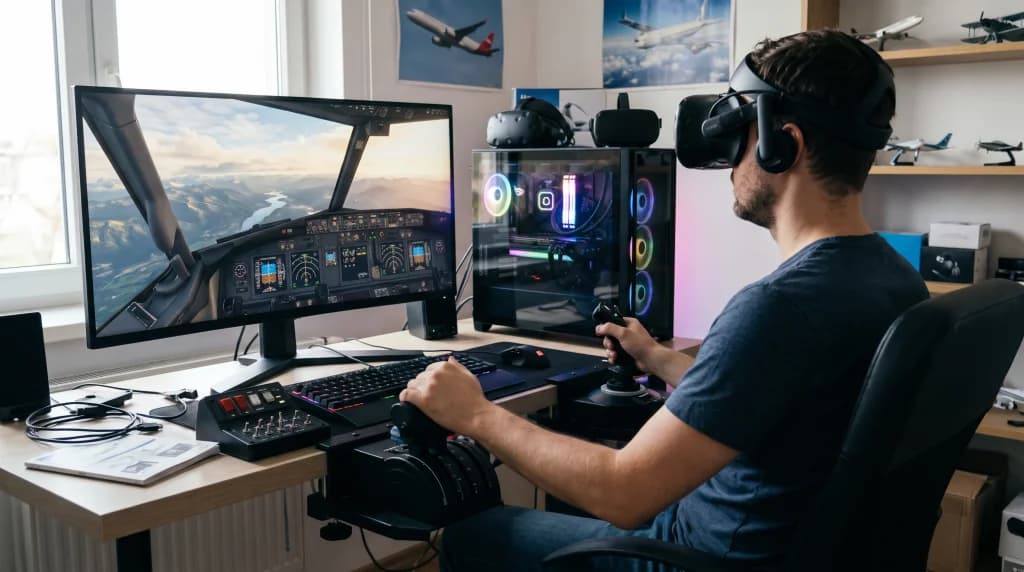
One of the most practical challenges of flying in VR is operating physical peripherals. Wearing an opaque headset means you cannot see your keyboard, mouse, kneeboard, or your own hands resting on the desk. Solving this requires thoughtful cockpit ergonomics:
- Muscle Memory and Dedicated HOTAS Hardware: A control setup consisting of a yoke or sidestick, a throttle quadrant, and rudder pedals must be firmly mounted in fixed positions. After just a few hours of practice, a pilot's hands instinctively locate the flap lever, speedbrakes, and landing gear handle purely by tactile feel.
- Interacting with Virtual Instruments: The most reliable way to flip overhead switches or program routes into the FMC/MCDU remains a standard computer mouse placed in a consistent spot beside your right (or left) hand. Optical hand-tracking systems and finger-mounted controller rings (such as PointCTRL) are also growing in popularity, allowing pilots to physically reach out and press virtual buttons in mid-air.
- Virtual EFB (Electronic Flight Bag): Thanks to utilities like Navigraph Charts integrated directly into the virtual cockpit, pilots can review approach plates, airport taxi diagrams, and METAR weather reports on a virtual iPad mounted to the side window without ever removing their headset during a multi-hour flight.
Conclusion: An Irreversible Shift in Perspective
Flying in virtual reality carries one undeniable drawback: after completing just a handful of flights in full three-dimensional space, returning to a flat desktop monitor becomes nearly impossible. A conventional screen suddenly feels small, lifeless, and detached—resembling a spreadsheet rather than a living aircraft.
Despite steep hardware requirements, meticulous optimization demands, and the minor physical weight of wearing a headset across long-haul sectors, VR technology has elevated home flight simulation to a level once reserved exclusively for multimillion-dollar airline training centers. The first time you fly a visual circling approach into Funchal or break out of dense fog on final into Warsaw—feeling your true height above the tarmac as raindrops streak across a 3D cockpit windshield—you realize virtual reality is far more than a novelty gadget. It is the definitive evolution of desktop aviation.