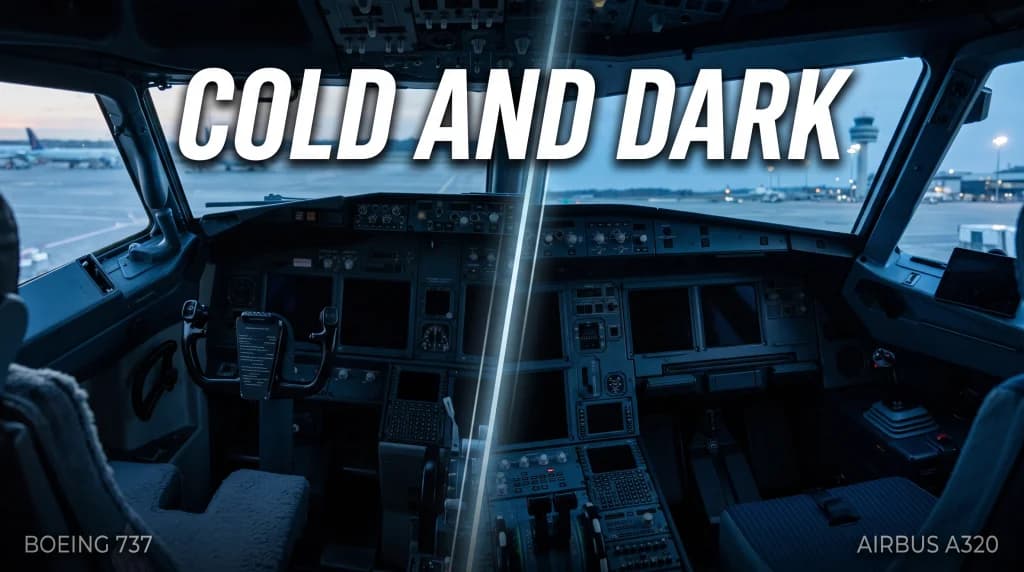
Cold and Dark Cockpit: How to Start the Airbus A320 and Boeing 737
Introduction: The Allure of Cold and Dark
For every serious flight simulation enthusiast, few sights compare to an airliner in a true Cold and Dark state. Stepping onto the flight deck in the quiet of early dawn, backlit only by a flashlight beam, sets an unmistakable tone. The LCD screens are unpowered, analog needles rest against mechanical stops, and the flight deck remains hushed except for rain tapping against the windshield. Tens of tons of complex avionics wait for that first surge of current. Bypassing this process with an automated engine autostart shortcut strips away the procedural core of simulation flying. True satisfaction begins when you understand the operational logic behind every switch, valve, and cockpit flow.
While the Airbus A320 and Boeing 737 stand as fierce rivals dominating the narrowbody commercial market, their design teams approached flight deck architecture and crew interface with radically contrasting philosophies. Airbus prioritized automation and the Dark Cockpit Concept, where an unlit switch signifies a nominal, automated system state. Boeing, by contrast, preserved the mechanical heritage tracing back to the 707 and 727, where pilots manually manipulate tactile toggle switches and actively monitor electrical buses and pneumatic ducts. This detailed guide walks you through the complete startup workflows for both aircraft from a completely dark cockpit to the pushback sequence.
Airbus A320: Ergonomic Automation and the Dark Cockpit Philosophy
Sitting in the captain's seat of the A320 (whether flying the Fenix simulation in MSFS or ToLiss in X-Plane), the clean layout of the cockpit immediately stands out. The overhead panel was engineered to minimize flight crew workload under standard line operations. The operational rule here is absolute: Lights Out. When no white or amber annunciator lights are illuminated across the panel, the associated systems are functioning automatically without requiring manual pilot input.
Step 1: Safety Scan and Battery Engagement
Prior to energizing electrical buses, the crew conducts a quick safety scan:
- Landing Gear Lever: Confirmed locked in the DOWN detent.
- Wiper Selectors: Set to OFF to prevent motor burn or windshield scratching upon initial power-up.
- Thrust Levers: Verified at IDLE, with ENG MASTER 1 and 2 switches secured in the OFF position.
- Engine Mode Selector: Positioned to NORM.
Next, direct your scan to the ELEC section on the overhead panel. Check battery condition by pressing the BAT 1 and BAT 2 pushbuttons and confirming on the adjacent analog voltmeters that each reads above 25.5 V. If either battery drops below this threshold, an external ground charge of at least 20 minutes is required. With nominal voltage confirmed, engaging both pushbuttons energizes the DC essential buses (DC ESS BUS). Avionics cooling fans spin up, and primary system status lights illuminate across the panels.
Step 2: External Power Connection and Fire Loops Check
Ship batteries provide only roughly 15 to 20 minutes of standby power before discharging. To sustain systems during pre-flight, call for a ground power unit (GPU). Once ground personnel connect the cable, a green AVAIL light appears on the EXT PWR pushbutton on the electrical panel. Depressing it toggles the display to a blue ON. The flight deck comes alive: the primary flight displays (PFD), navigation displays (ND), and the Electronic Centralized Aircraft Monitor (ECAM) begin their startup cycles.
Before spooling up the auxiliary power unit (APU), conduct the required fire detection tests for the engines and APU. On the overhead FIRE panel, press and hold the TEST pushbutton on each loop to verify:
- Continuous repetitive chime sounding in the flight deck.
- Master Warning lights flashing on the glare shield.
- Illumination of the overhead FIRE pushbuttons in red, along with SQUIB and DISCH annunciators.
- Respective red engine/APU warning messages on the upper ECAM display.
Step 3: Aligning the ADIRU Inertial Systems
Without its inertial reference units aligned, the aircraft cannot determine position or spatial attitude. On the upper left corner of the overhead panel, locate the ADIRS (Air Data Inertial Reference System) control unit. Turn the rotary switches for IR 1, IR 2, and IR 3 from OFF to NAV. The amber ON BAT lights flash momentarily, validating the backup battery supply for the laser ring gyros. The navigation displays then show the alignment countdown (typically 5 to 7 minutes, depending on the airfield's latitude).
Step 4: APU Start Sequence and Pneumatic Transition
As departure approaches and ground crews prepare to disconnect ground services, start the APU (Auxiliary Power Unit)—the small gas turbine situated in the tail cone:
- Press the APU MASTER SW pushbutton (blue ON light illuminates). The system opens the external intake flap and powers the fuel feed valve.
- Wait roughly 3 to 5 seconds, then press the APU START pushbutton (blue ON illuminates).
- Monitor the lower ECAM APU page. Once turbine speed reaches a steady 100% and the APU generator comes online, the START button switches to a green AVAIL light.
- Depress APU BLEED. Bleed air now feeds the environmental control packs and pneumatic manifolds, allowing external conditioning and the GPU to be disconnected safely.
Boeing 737: Tactile Switches and Manual Bus Management
Transitioning into the flight deck of the Boeing 737 (such as the PMDG 737 in MSFS or ZiboMod in X-Plane) places you in an environment shaped by a classic flight deck heritage. You will not find modern dark-cockpit pushbuttons here. Instead, the overhead panel is defined by analog meters with rotary selectors, mechanical toggle switches fitted with guards, and extensive annunciator arrays. The 737 asks the crew to physically manage bus connections and pneumatic crossfeeds.
Step 1: Battery Power and Ground Electrical Setup
Begin the initial flow by lifting the red guard and switching the BATTERY switch to ON. Verify critical switch guards are down:
- STANDBY POWER: Guard down, switch in AUTO.
- Landing Gear Lever: Secured down with three green lights showing (or verified once powered).
- Engine Start Levers: Secured down in CUTOFF on the center pedestal.
- Parking Brake: Confirmed set.
Rotate the DC VOLTS selector to the BAT position, verifying a minimum reading of 24 V. When the ground service unit is plugged into the aircraft, the white GRD PWR AVAILABLE annunciator lights up on the electrical panel. Unlike an Airbus, the Boeing does not automatically transfer the load. The pilot must physically click the spring-loaded GRD PWR toggle switch downward to connect external power to GEN BUS 1 and GEN BUS 2. In response, avionics cooling blowers engage and digital flight instrument readouts flicker to life.
Step 2: IRS Alignment Procedures
On the upper left overhead panel, locate the twin IRS mode select switches. Rotate both selectors from OFF through ALIGN to NAV. The white ALIGN status lights illuminate steadily. On the ISDU overhead display or the CDU/FMC POS INIT page, verify and enter the reference airport and exact gate coordinates. The inertial platform alignment will run for approximately 6 to 10 minutes.
Step 3: Overhead Safety Flow and Essential Systems
Work downward across the overhead panel using a structured scan:
- Close the guard on the EMER EXIT LIGHTS switch, locking it into the ARMED setting.
- Turn the passenger signs to the desired departure configuration: FASTEN BELTS set to ON.
- Confirm normal pressure readings on the crew oxygen indicator and brake pressure accumulator.
- Engage all four WINDOW HEAT switches to protect against cockpit glass fogging and ensure structural pliability against terminal-area bird strikes.
Step 4: Starting the Boeing 737 APU
Spooling up the APU on the 737 requires manual fuel routing on the panel:
- Turn on at least one main AC fuel pump—by convention the LEFT AFT FUEL PUMP—which pressurizes the fuel feed manifold leading directly to the APU. (While the APU can draw fuel by gravity, operating the pump prevents vapor lock in the fuel line.)
- Move the APU toggle switch from OFF, past ON, momentary to START, and release it back to the spring-centered ON position.
- Observe the EGT gauge on the APU panel. The needle swings upward during ignition, peaks safely below starting redlines, and settles into a stable green arc.
- Once the APU reaches operating RPM, the blue APU GEN OFF BUS light illuminates on the electrical panel.
- Critical step: The aircraft remains on external ground power until transferred! The pilot must manually flip both left and right APU GEN switches downward. The blue annunciators extinguish, confirming the APU generator has assumed the electrical load.
- Switch on the APU BLEED toggle, then configure both air conditioning switches (PACK L and PACK R) to AUTO.
FMC vs. MCDU Setup: Flight Management Architecture
With both airframes energized and conditioned air circulating through the cabin, focus shifts to initializing navigation computers. While keyboard interfaces and screen layouts vary, the logical structure of flight setup remains uniform.
Airbus MCDU Programming: The DIFSRIP Sequence
Airbus crews frequently utilize the standard mnemonic DIFSRIP to structure their initialization flow:
- D (Data): Cross-check navigation database status and the active AIRAC cycle validity dates.
- I (Init A): Enter city pairs (FROM/TO, e.g.,
EPGD/EPWA), alternate airport, callsign, assigned Cost Index, and initial cruise flight level (CRZ FL). Conclude by selectingALIGN IRS. - F (Flight Plan): Select the active departure runway, assigned SID, enter routing airway corridors (VIA) paired with termination points (TO), and establish the STAR and approach procedure at the destination.
- S (Sec F-Plan): Copy the active flight plan into the secondary flight plan buffer to support immediate return procedures in the event of an engine failure.
- R (Rad Nav): Confirm automatic or manual tuning of relevant VOR stations and ILS frequencies.
- I (Init B): Enter operating mass values: ZFW (Zero Fuel Weight), the zero fuel center of gravity (ZFWCG), and total dispatched BLOCK FUEL. The system computes accurate takeoff weights and vertical profiles.
- P (Perf): Input calculated takeoff performance figures: $V_1$ (decision speed), $V_R$ (rotation speed), and $V_2$ (single-engine safety speed), along with flap configuration (e.g.,
1/UP0.5) and assumed flexible takeoff temperature (FLEX TEMP) for reduced-thrust departures.
Boeing 737 CDU/FMC Initialization Flow
On the 737, work systematically through the dedicated function keys across the CDU keypad:
- IDENT: Confirm the aircraft model, engine variants, and navdata validity dates.
- POS INIT: Enter the reference ICAO code into the REF AIRPORT field, copy gate GPS coordinates, and paste them into the
SET INERTIAL POSprompt. - RTE: Populate the ORIGIN, DEST, and flight number fields. Across subsequent route pages, string the flight plan: left-side keys assign airways (VIA), while right-side keys define exit waypoints (TO). Select ACTIVATE and confirm via the illuminated EXEC key.
- DEP/ARR: Select the active runway and assigned SID, then press EXEC to commit the legs to active memory.
- PERF INIT: Enter ZFW (double-clicking the line-select key adjacent to the field populates calculated empty weight on most simulation models), route RESERVES, Cost Index, and planned CRZ ALT. Execute changes.
- N1 LIMIT: Set takeoff thrust derates or enter an Assumed Temperature to reduce turbine wear and preserve engine longevity.
- TAKEOFF: Set departure flaps (typically
Flaps 5), click to confirm the operating CG percentage, and generate $V_1$, $V_R$, and $V_2$ speeds. Note down the calculated elevator trim figure and manually set it on the physical trim wheel indicator on the pedestal.
Pushback Preparation and Engine Start Flow
Once cabin doors are secured and the jet bridge swings clear, both flight crews run their final flows prior to tug pushback.
A320 Final Pushback Flow
- Fuel Pumps: Depress all 6 pushbuttons on the overhead FUEL panel (unlit buttons confirm automatic flow management).
- Beacon Light: Set the beacon switch to ON. The flashing red strobe on the fuselage upper and belly surfaces alerts ramp teams that hydraulic circuits are active and engine start is imminent.
- Doors and Slides: Verify the DOOR/OXY page on the lower ECAM displays all passenger doors closed and slides armed in amber/green.
- External Power Cutoff: Disengage the EXT PWR switch and instruct the ground crew to disconnect the cable.
Boeing 737 Final Pushback Flow
- Fuel Pumps: Flip all FUEL PUMP switches to the up ON position (engaging center tank pumps only when containing usable fuel).
- Hydraulics: Confirm the electric hydraulic pump switches (ELEC 1 and ELEC 2) are selected ON.
- Anti-Collision Light: Position the ANTI COLLISION switch to ON.
- Air Conditioning Packs: Crucially, switch both PACKS to OFF immediately before engine start. The CFM56 turbofans on the 737 require substantial pneumatic pressure from the APU to spin the air starters; leaving air conditioning packs running diverts essential duct pressure needed for starter engagement.
Conclusion: Two Philosophies, One Standard of Flight
Powering up an airliner from an inert Cold and Dark state highlights the fundamental design philosophies of two leading aerospace manufacturers. The Airbus A320 views the flight crew as managers of networked digital controllers—flows are compact, indicators extinguish when nominal, and flight-envelope protections run seamlessly in the background. The Boeing 737 maintains a tactile connection to mechanical flight—you actively manipulate electrical paths, monitor pneumatic manifolds on dedicated gauges, and trace the routing of every switch.
Mastering these procedural Cold and Dark workflows is what separates casual gaming from authentic flight simulation. When wind and rain buffet your virtual airframe on the apron, systematically powering up electrical, hydraulic, and navigation buses with calm precision turns a flight simulation session into a genuine exercise in airmanship.